
Introduction
There are a few Dataverse features that feel perfectly reasonable when you are building a model-driven app, but become a little more awkward when you try to report on them.
Polymorphic lookups are one of those features. They work well and prevent us having to create multiple single lookup columns and they don’t overcomplicate Power Automate querying.
However, in Power BI they can leave you staring at a column of GUIDs asking a very reasonable question:
What table is this actually pointing at?
And that is why I have ended up thinking of them as Schrödinger’s column.
Until we inspect the data properly, the lookup is both one thing and another. It might be an account. It might be a contact. It might be a user. It might be a team. In my demo example, it might be a character or an organisation.
The GUID exists for us in Power BI, but without the context of which table that guid is from, it is only half the story.
This post is about how polymorphic lookups work, why we use them in model-driven apps, what extra information we get when querying them through Power Automate, and how we can reshape the data in Power BI or Fabric so the report model can actually use it.
What is a polymorphic lookup?
A polymorphic lookup is a lookup column that can reference more than one table.
A standard lookup is more direct.
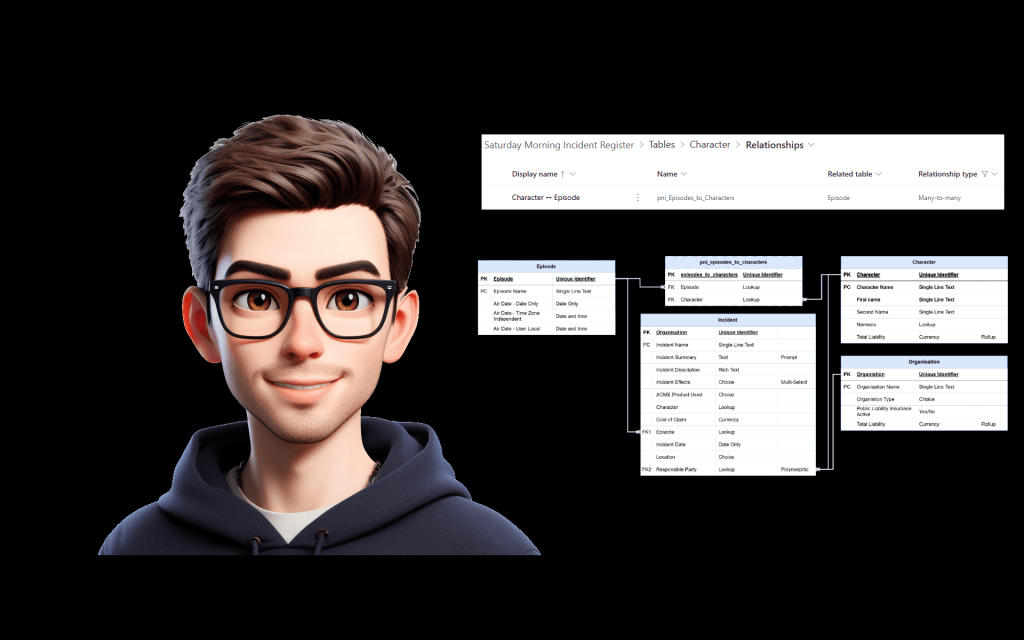
For example, if I have an Incident table with a lookup to Episode, then each incident can point to one episode. The lookup column stores the ID of the related episode row.
That relationship has a fixed target.
Incident -> Episode
A polymorphic lookup works differently.
The lookup still stores a reference to a row, but the target table can change depending on the selected record.
A common example in Dataverse is Owner. A row can be owned by either a user or a team.
Another common example is Customer, where the customer can be either an account or a contact.
In my demo data, I have an Incident table with a Responsible Party column. The responsible party might be a character, but it might also be an organisation.
For example:
| Incident | Responsible Party | Actual Table |
|---|---|---|
| Rocket Skates Gone Wrong | Wile E. Coyote | Character |
| Faulty Product Claim | ACME Corporation | Organisation |
From the point of view of the form, that is a nice experience.
The user gets one field called Responsible Party.
They do not have to pick between separate fields like Responsible Character and Responsible Organisation.
Why use them in model-driven apps?
The main reason is that the business concept does not always belong to one table.
If I ask, “who is responsible for this incident?”, the answer might not always be the same type of thing.
Sometimes it might be a person.
Sometimes it might be a company.
Sometimes it might be a team.
Sometimes it might be another custom table entirely.
We could model that by creating multiple lookup columns.
For example:
Responsible CharacterResponsible OrganisationResponsible Team
But that can get messy very quickly.
You then have to think about things like:
- Which lookup should the user fill in?
- How do we stop them filling in more than one?
- How do we make the form look clean?
- How do we write views that show the correct responsible party?
- How do we make the data easy to understand later?
A polymorphic lookup solves the app side of that problem by giving us one field that can support multiple target tables.
That is the bit I like.
It lets the model-driven app represent the question the user is actually answering.
Not:
Which one of these three technical lookup columns should I use?
But:
Who or what is this related to?
That is a much better user experience.
The catch is that Power BI does not care how tidy the form looked. It cares about relationships, keys, tables and columns.
So eventually we have to translate that flexible app design into something that works cleanly in a reporting model.
What it looks like in Power Automate
Power Automate is useful here because it shows us something important about polymorphic lookups.
When we query a Dataverse row that contains a polymorphic lookup, we do not just get the lookup ID. We can also get metadata that tells us the logical name of the table that lookup is pointing to.
Using my Responsible Party example, the output might look something like this:
{ "_pni_responsibleparty_value": "8d9b5f3e-0000-0000-0000-000000000001", "_pni_responsibleparty_value@Microsoft.Dynamics.CRM.lookuplogicalname": "pni_character"}
That gives us two separate pieces of information.
First, we have the ID:
_pni_responsibleparty_value
Then we have the table logical name:
_pni_responsibleparty_value@Microsoft.Dynamics.CRM.lookuplogicalname
That second value is the key bit.
If the lookup logical name is:
pni_character
Then the ID belongs to the Character table.
If the lookup logical name is:
pni_organisation
Then the ID belongs to the Organisation table.
That means in Power Automate we can build logic around it.
For example, we could use a switch statement:
If lookup logical name = pni_character Get row from CharacterIf lookup logical name = pni_organisation Get row from Organisation
Power Automate gives us enough information to understand both parts of the lookup:
What is the row ID?Which table does that row ID belong to?
That is exactly the context we need.
Where Power BI catches us out
The problem starts when we bring the same table into Power BI.
When we connect to Dataverse and pull in the Incident table, we can see the lookup ID for the polymorphic lookup.
So we might get something like:
| Incident | Responsible Party ID |
|---|---|
| Rocket Skates Gone Wrong | 8d9b5f3e-0000-0000-0000-000000000001 |
| Faulty Product Claim | b3e7a912-0000-0000-0000-000000000002 |
But we do not get the lookup logical name presented as a normal column in the same way that we see it in Power Automate.
So now Power BI has the row ID, but not the context of what table it came from.
That leaves us with a slightly annoying problem.
The Responsible Party ID could relate to the Character table.
It could relate to the Organisation table.
From the ID alone, Power BI cannot tell.
This is the Schrödinger’s column problem.
We know there is a type value available somewhere because Power Automate can show it to us. But when we bring the table into Power BI, that context is not sitting there as a nice obvious column.
So until we work out the table behind the ID value, we do not really know what we are looking at.
Why this matters in a report
This is not just a technical annoyance.
It affects what the report builder can actually do.
If I want to show a table of incidents and responsible parties, I do not want to show this:
| Incident | Responsible Party ID |
|---|---|
| Rocket Skates Gone Wrong | 8d9b5f3e-0000-0000-0000-000000000001 |
| Faulty Product Claim | b3e7a912-0000-0000-0000-000000000002 |
That is technically accurate, but it is useless to a report consumer.
What I actually want is this:
| Incident | Responsible Party | Type |
|---|---|---|
| Rocket Skates Gone Wrong | Wile E. Coyote | Character |
| Faulty Product Claim | ACME Corporation | Organisation |
That gives the report enough context to be useful.
It also gives the person building the report a much clearer model to work with.
Without that extra type column, you end up having to guess where the lookup points. And guessing is not really where we want to be when building a reporting model.
The shape I want in Power BI
When dealing with this in Power BI, my aim is to create a clean reporting table that represents the possible responsible parties.
In Dataverse, the Responsible Party column is polymorphic.
In Power BI, I want a table that behaves like a normal dimension.
Something like this:
Incident -> Responsible Party
Where Responsible Party contains all the possible records that the polymorphic lookup could point to.
In my demo, that means creating a Responsible Party table that combines:
CharacterOrganisation
The final table should look something like this:
| Party ID | Party Name | Type |
|---|---|---|
| 8d9b5f3e-0000-0000-0000-000000000001 | Wile E. Coyote | Character |
| b3e7a912-0000-0000-0000-000000000002 | ACME Corporation | Organisation |
Once I have that table, the Incident table can relate to it using the Responsible Party ID.
This means the report model gets a single relationship path, even though the original Dataverse lookup could point to multiple tables.
That is the translation step.
Dataverse gives us a flexible app-friendly lookup.
Power BI gets a reporting-friendly table it can actually use.
Resolving the problem in Power BI
The way I resolve this is in Power Query.
The key thing we are trying to do is take each possible target table for the polymorphic lookup and reshape them into one consistent structure.
For this example, the Responsible Party column can reference:
CharacterOrganisation
So I need to create a query for characters, create a query for organisations, make sure both queries have the same column names, and then append them together.
The final output becomes my Responsible Party table.
Step 1: Find the possible target tables
The first thing we need to know is which tables the polymorphic lookup can reference.
In my example, the Responsible Party lookup can point to:
CharacterOrganisation
This is important because Power BI will not give us the lookup logical name in the same helpful way that Power Automate does.
So before we can fix the reporting model, we need to understand the Dataverse model.
For a production system, I would document this clearly because the person building the report needs to know all the possible target tables.
For this demo, I know Responsible Party can reference Character and Organisation, so those are the two tables I need to bring together.
Step 2: Reference the Character table
In Power Query, I start by referencing the Character table.
I use a reference rather than changing the original Character query directly, because I still want to keep the Character table available in the model for its normal purpose.
Then I remove the columns I do not need.
For this Responsible Party table, I only need the columns that help me identify and describe the party.
In my example, that means keeping:
Character IDCharacter NameOrganisation
The exact column names will depend on your Dataverse schema, but the point is that I only keep the fields needed for this reporting shape.
Then I add a custom column called Type.
The value for this column is:
Character
At this point, I have a query that represents characters in a responsible party shape.
I would then rename this query to:
Responsible Character
Step 3: Reference the Organisation table
Next, I do the same thing for Organisation.
In Power Query, I reference the Organisation table.
Then I remove all columns except for the ID and name columns.
For example:
Organisation IDOrganisation Name
Then I add a custom column called Type.
The value for this column is:
Organisation
I then rename this query to:
Responsible Organisation
Now I have one query for responsible characters and one query for responsible organisations.
But at this stage, they probably still have different column names.
One has Character ID and Character Name.
The other has Organisation ID and Organisation Name.
Before I append them together, I need them to have the same structure.
Step 4: Rename the columns into a shared structure
This is the bit that makes the append work properly.
Both queries need to use the same column names for the columns that represent the same concept.
So in the Responsible Character query, I rename the columns to something generic:
| Original Column | New Column |
|---|---|
| Character ID | Party ID |
| Character Name | Party Name |
| Type | Type |
Then I do the same thing in the Responsible Organisation query:
| Original Column | New Column |
|---|---|
| Organisation ID | Party ID |
| Organisation Name | Party Name |
| Type | Type |
The important thing is that both queries now have matching column names.
So Responsible Character looks something like this:
| Party ID | Party Name | Type |
|---|---|---|
| 8d9b5f3e-0000-0000-0000-000000000001 | Wile E. Coyote | Character |
And Responsible Organisation looks something like this:
| Party ID | Party Name | Type |
|---|---|---|
| b3e7a912-0000-0000-0000-000000000002 | ACME Corporation | Organisation |
Now the two queries are ready to be appended.
If one of the source queries has an additional column that only makes sense for that record type, such as Organisation on the Character query, that is fine as long as you are intentional about it. When the tables are appended, rows from the other query will simply have blank values for that column.
The key columns that must line up are the ones we need for the relationship and reporting:
Party IDParty NameType
Step 5: Append the tables into Responsible Party
The next step is to append Responsible Character and Responsible Organisation as a new query.
This gives me a single table containing all possible responsible parties.
I rename this new query to:
Responsible Party
The final table looks something like this:
| Party ID | Party Name | Type |
|---|---|---|
| 8d9b5f3e-0000-0000-0000-000000000001 | Wile E. Coyote | Character |
| b3e7a912-0000-0000-0000-000000000002 | ACME Corporation | Organisation |
This is now a reporting-friendly version of the polymorphic lookup.
Instead of Power BI having to deal with an ID that could point to multiple tables, we have created one table that contains all possible values.
The Type column gives us the missing context.
The Party Name column gives us the friendly display value.
The Party ID column gives us the key we need for the relationship.
Step 6: Create the relationship
Once the Responsible Party table has been created, I can go back into the model view and create a relationship.
In my example, I relate the polymorphic lookup ID from the Incident table to the Party ID column in the Responsible Party table.
Conceptually, that looks like this:
Incident[Responsible Party ID] -> Responsible Party[Party ID]
This is the important part of the solution.
The Incident table still contains the original polymorphic lookup ID from Dataverse.
But now that ID has somewhere sensible to go.
Instead of trying to relate Incident directly to Character and Organisation separately, I relate it to the combined Responsible Party table.
That gives me a normal relationship path for reporting.
What this gives us
After creating the Responsible Party table, the report model becomes much easier to work with.
I can now report on:
Responsible Party[Party Name]Responsible Party[Type]
So instead of showing users this:
| Incident | Responsible Party ID |
|---|---|
| Rocket Skates Gone Wrong | 8d9b5f3e-0000-0000-0000-000000000001 |
| Faulty Product Claim | b3e7a912-0000-0000-0000-000000000002 |
I can show them this:
| Incident | Responsible Party | Type |
|---|---|---|
| Rocket Skates Gone Wrong | Wile E. Coyote | Character |
| Faulty Product Claim | ACME Corporation | Organisation |
That is a much better reporting experience.
The Dataverse model still gets to use the polymorphic lookup.
Power BI gets a clean dimension-style table that it can relate to.
And the report builder gets the missing table context back.
Why this works well
I like this approach because it keeps the fix in the reporting layer.
We are not changing the Dataverse table just to make Power BI easier.
We are not adding extra columns into Dataverse that then need to be maintained.
We are simply reshaping the data in Power Query so the semantic model has a proper table to work with.
It also keeps the logic visible.
If someone opens the Power BI model, they can see the Responsible Party table and understand that it is the reporting-friendly version of the polymorphic lookup.
That is much easier to explain than leaving a GUID in the Incident table and expecting someone else to work out where it came from.
One thing to be careful with
When creating this kind of helper table, make sure every referenced table uses the same final column structure before you append them.
If one query uses:
Character IDCharacter Name
And another query uses:
Organisation IDOrganisation Name
Power Query will treat those as separate columns when you append them.
That is not what we want.
We want both queries to use the same shared column names before the append:
Party IDParty NameType
That shared structure is what allows the final Responsible Party table to behave like a proper reporting table.
It is a small step, but it is the bit that makes the whole approach work.
Should we solve this in Dataverse instead?
You could also solve this before the data reaches Power BI.
For example, you could create additional columns on the Dataverse table, such as:
Responsible Party TypeResponsible Party Name
Then populate them using Power Automate, a plugin, or another process.
That can make reporting easier because Power BI receives the already-prepared values.
But I would be careful with this approach.
Once you start storing the display name separately, you need to think about keeping it up to date.
What happens if the related record is renamed?
What happens if the lookup changes?
What happens if the type changes?
It might still be the right answer, especially if several reporting tools or integrations need the same flattened value. But I would not add duplicated reporting columns into Dataverse without being clear on why they are needed and how they will be maintained.
For a Power BI-specific reporting issue, I would usually start by solving it in Power Query.
How I would document this
If a polymorphic lookup is going to be used in reporting, I would document it more explicitly than a normal lookup.
I would not just write:
Responsible Party lookup
Because that hides the important bit.
I would document the possible target tables and the reporting approach.
For example:
| Item | Detail |
|---|---|
| Column | Responsible Party |
| Type | Polymorphic lookup |
| Stored ID column | _pni_responsibleparty_value |
| Possible target tables | Character, Organisation |
| Reporting approach | Create Responsible Party table in Power Query |
| Power Query approach | Reference target tables, rename shared columns, add Type column, append as new |
| Relationship | Incident[Responsible Party ID] to Responsible Party[Party ID] |
| Useful reporting columns | Party Name, Type |
That gives the report builder the context they need before they start pulling tables into Power BI.
It also makes it clear that this is not a standard lookup relationship.
That is the bit I think matters most.
Polymorphic lookups need a bit of explanation when they leave Dataverse.
Final thoughts
Polymorphic lookups are useful in Dataverse because they let us model a business concept without forcing users into multiple separate lookup columns.
But when that data reaches Power BI, the lookup ID on its own is not enough.
Power Automate shows us the missing piece by exposing the lookup logical name. That tells us which table the ID belongs to.
Power BI does not hand us that same context as neatly, so we need to recreate it ourselves.
For me, the cleanest way to do that is to build a Responsible Party table in Power Query.
Reference each possible target table.
Shape them into the same structure.
Add a Type column.
Append them together.
Then relate the original polymorphic lookup ID to the new combined table.
That gives Power BI the context it was missing.
The column is no longer stuck halfway between Character and Organisation.
We have opened the box, checked what the value is, and given Power BI a table it can actually report against.



Leave a Reply