Introduction
Recently I have been preparing for an in-person workshop with Laura Graham-Brown around bringing Power BI and Dataverse together.
As part of that, one of the topics I wanted to cover was something that is really useful when building model-driven apps, but can become a bit awkward when the data starts moving into Power BI or Fabric.
That topic is out-of-the-box many-to-many relationships in Dataverse.
Now to be clear, I like many-to-many relationships in Dataverse.
They solve a real problem.
If you have two tables where records on both sides can be related to multiple records on the other side, Dataverse gives you a very quick way to configure that. You can create the relationship, add a subgrid or related table to your form, and users can start associating records together without us having to build loads of extra functionality.
The issue is not really with using the feature.
The issue is with how well we document it.
Because behind that nice model-driven app experience, Dataverse creates a relationship table in the background. That table is what stores the links between the two sides of the many-to-many relationship.
As Power Platform developers or solution architects, we might not think about that table too much because we are not usually working with it directly.
But when a Power BI developer or data analyst comes along and needs to report on that data, that table becomes very important.
If we have not documented it, they may not know it exists.
And if they do not know it exists, they may not know to pull it into Power BI.
So this post is about how we can document Dataverse many-to-many relationships more clearly, especially when those relationships need to be consumed by Power BI or Fabric.
A Quick Recap on Many-to-Many Relationships
A many-to-many relationship is used when records in one table can be related to multiple records in another table, and records in that second table can also be related to multiple records in the first table.
For example, imagine we have two Dataverse tables:
- Episodes
- Characters
One episode can include many characters.
One character can appear in many episodes.
That is a many-to-many relationship.
In a model-driven app, this is a really nice fit. We can open an episode and see the characters that appear in it. We can open a character and see the episodes they appear in.
From the user’s perspective, it makes sense.
From the maker’s perspective, it is quick to configure.
From the reporting perspective, there is one extra detail we need to care about.
The relationship is not stored directly in either of the two main tables.
Instead, Dataverse creates a joining table.
Microsoft describes many-to-many relationships as using a special relationship table, also known as an intersect table, so that many rows from one table can be related to many rows from another table. The many-to-many relationship metadata also includes an RelationshipTableName, which is the name of the joining table for that relationship.
That intersect table is the bit we need to remember when documenting the data model.
Why Would We Use an Out-of-the-Box Many-to-Many Relationship?
Before we get into the reporting side, it is worth covering why we might use these relationships in the first place.
Because there are good reasons.
The main benefit is that they are quick and clean to set up.
If all we need to do is associate records between two tables, an out-of-the-box many-to-many relationship can save us from creating a custom linking table manually.
For example, if we are building a simple app where users need to link characters to episodes, we can create a many-to-many relationship between those two tables and then expose that through the model-driven app.
We do not need to create a separate table called something like Episode Character.
We do not need to create two lookup columns.
We do not need to create extra forms and views for managing the linking table.
Dataverse handles the relationship for us.
That can make the model-driven app easier to build and easier to use.
There are also some scenarios where the relationship really is just a relationship. There is no extra data we need to capture about it. We just need to know that record A is linked to record B.
In those cases, the out-of-the-box many-to-many relationship can be a sensible option.
The Trade-Off
The trade-off is that the relationship table is not something we really control in the same way as a normal custom table.
As Power Platform developers, that matters.
With a custom junction table, we can add our own columns. We can add business logic. We can add forms, views, business rules, flows, plugins, security patterns and all the other things we might normally use.
With an out-of-the-box many-to-many relationship, the intersect table is there to support the relationship.
It is not really there for us to extend into a proper business concept.
That is why I tend to think about it like this:
If the relationship is just a link, an out-of-the-box many-to-many relationship may be fine.
If the relationship needs data of its own, create a proper custom junction table.
For example, this is probably fine as an out-of-the-box many-to-many relationship:
Characters <> Episodes
If all we need to know is which characters appeared in which episodes, the relationship is just a link.
But this probably wants to be a custom table:
Consultants <> Projects
Because we might need to know things like:
- Start date
- End date
- Role
- Allocation percentage
- Day rate
- Status
- Notes
At that point, the relationship itself has business data.
So it deserves to be a real table.
Where This Becomes Awkward for Power BI
The awkward bit comes when we hand the data model over to someone building a report.
In the model-driven app, the relationship feels obvious. The users can see related records on the form. They can associate and disassociate records. Everything appears to work nicely.
But when someone connects to Dataverse from Power BI, they are not looking at your form.
They are looking at tables.
If they pull in the Episodes table and the Characters table, they may expect to see a direct way to relate them.
But there is no direct lookup column between those two tables.
The relationship is stored in the joining table.
So for reporting, the model is not really this:
Episodes <> Characters
It is actually this:
Episodes -> Episode Character -> Characters
Or, using more Power BI-friendly language:
Episodes -> Bridge Table -> Characters
Power BI guidance for many-to-many modelling commonly talks about using a bridging table between the two main tables. That bridge table stores the valid combinations between records on either side of the relationship.
That is effectively what the Dataverse joining table is doing.
So if the Power BI developer does not include that table, they are missing the bit that tells them which records are connected.
This is why documenting the relationship as just a many-to-many line on an ERD is not always enough.
For a Power Platform developer, that may be meaningful.
For a Power BI developer, we probably need to be more explicit.
How I Would Show This on an ERD
This is where I think the documentation needs to change depending on the audience.
If I am documenting the data model for another Power Platform developer, or I am producing a high-level design diagram, I might show the relationship like this:
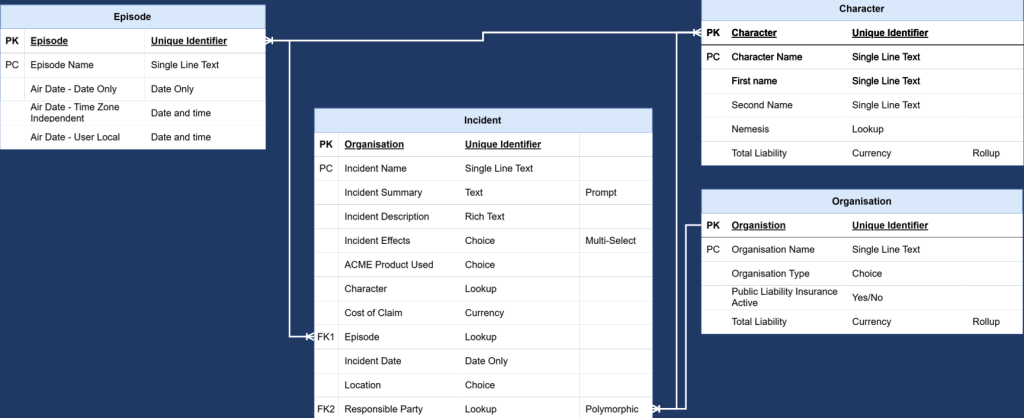
In this example we can see using crows foot notation the many to many relationship between episode and character. At a high level, this is not wrong.
There is a many-to-many relationship between Episodes and Characters. From a Dataverse maker perspective, that is the relationship we created, and that is how we would usually talk about it when designing the model-driven app.
The problem is that this version of the ERD hides the bit that matters when the data is being consumed outside of Dataverse.
It tells someone that Episodes and Characters are related, but it does not tell them how that relationship is stored.
That becomes important when the model is handed over to someone building a report in Power BI or Fabric.
From their perspective, they need to know which tables to bring in and how those tables should be related. If the ERD only shows the two main tables, they may quite reasonably assume that they only need to import those two tables.
But that is not enough.
Once we have found the relationship table name, I would update the ERD to show the intersect table explicitly.
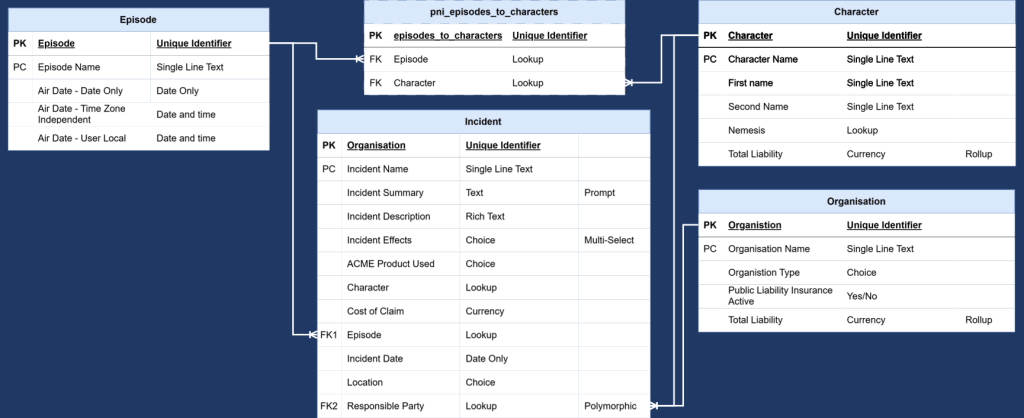
This version is more useful for reporting because it shows the actual structure the report builder needs to understand.
Instead of documenting it as:
Episodes <> Characters
We are now documenting it as:
Episodes 1:* Episode Character *:1 Characters
The middle table is the important bit.
Even if users never see it in the model-driven app, and even if we do not work with it directly in the same way as a custom table, it still exists as part of the data model.
For Power BI and Fabric, that means it needs to be documented.
I would usually include the relationship table name either directly on the ERD or in a supporting table underneath it. The ERD helps people understand the shape of the model, while the supporting table gives them the exact table name they need to look for.
For example:
| Item | Example |
|---|---|
| Table 1 | Episodes |
| Table 2 | Characters |
| Relationship type | Out-of-the-box many-to-many |
| joining table name | pni_episodes_to_characters |
| Recommended reporting pattern | Episodes 1:* joining Table *:1 Characters |
| Required in Power BI/Fabric | Yes |
This gives us two useful versions of the documentation.
The first diagram is useful for explaining the app design.
The second diagram is useful for explaining the reporting model.
That distinction is important because the people consuming the documentation may not all need the same level of detail. A maker working inside Dataverse may understand what the many-to-many relationship means. A report builder working in Power BI needs to know that there is an additional table they need to include.
What This Looks Like in Power BI
When the Power BI developer connects to Dataverse, they need to include the two main tables and the joining table. Unlike in Dataverse where we can see all the tables in our solution, in power BI when we pull the data we need to search for the tables, if the data analyst isn’t aware of the joining table they may not pull it in.
Using the example from earlier, they would need:
- Episodes
- Characters
- Episode Character joining table
The model would then use the joining table as the bridge.
Something like:
Episodes[pni_episodeid] 1 -> *Episode Character[pni_episodeid]Characters[pni_characterid] 1 -> *Episode Character[pni_characterid]
That gives Power BI the information it needs to understand which episodes relate to which characters.
Without that joining table, Power BI has the two tables but not the relationship between them.
This is usually where confusion starts.
The app shows the records as related.
The report builder cannot see how they are related.
Both things are true.
The missing piece is the joining table.
Native Many-to-Many vs Custom Junction Table
As with most things in Power Platform, the answer is not “always use this” or “never use this”.
It depends what you need the relationship to do.
I would use a native many-to-many relationship where:
- The relationship is just a link
- I do not need extra columns on the relationship
- The model-driven app experience is the main concern
- The reporting requirements are simple and well documented
I would use a custom junction table where:
- The relationship needs extra data
- The relationship has its own business process
- Users need to manage the link as a record in its own right
- Security needs to be applied specifically to the relationship record
- Power Automate needs to work directly with the relationship record
- The reporting model needs to treat the relationship as a meaningful business object
For example:
Student <> Course
Might be fine as a native many-to-many relationship if all we care about is which students are linked to which courses.
But:
Student -> Enrolment -> Course
Is probably better if we need to track enrolment date, completion status, grade, payment status or attendance.
At that point, Enrolment is not just a technical bridge.
It is a business table.
Final Thoughts
Out-of-the-box many-to-many relationships in Dataverse are useful.
They make model-driven app design easier, especially when all we need is a simple link between two tables.
But they are also one of those features where the app experience can hide some of the underlying data model.
That is fine while everyone is working inside Dataverse.
It becomes less fine when the data needs to be used in Power BI or Fabric.
The main thing I would take from this is that we need to document the relationship table, not just the relationship.
If an ERD or handover document only says:
Episodes <> Characters
That might be enough for another Power Platform developer.
But it probably is not enough for the person building the report.
For them, we need to say:
Episodes 1:* Episode Character *:1 Characters
And we need to give them the actual intersect table name.
It is a small bit of documentation, but it can save a lot of confusion later.
Especially when someone is trying to work out why the model-driven app clearly shows related records, but Power BI does not appear to know how those records are connected.




Leave a Reply