
I received a question recently from a community member, they had asked why their dynamic content from their excel table was not accesible in the dynamic content menu. As it turned out they were dynamically selecting the excel file like below

In this scenario the user was uploading an excel file into a document library, this excel file contained a table called Table 1 that had the same structure across each of the uploaded documents. The community member wanted to take the rows in excel and move them into Dataverse but was unable to as Power Automate could not generate the dynamic content as it didn’t have a defined table schema it could refer to.
Fortunately there is a way to still access this content dynamically when the table structure is known. Lets take an example table
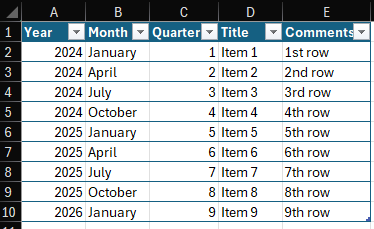
When we upload this excel file with the flow in it’s current state the list rows function provides us outputs in JSON format. If we know the strucutre of the excel table then we can accurately predict what the JSON format is and manually define the dynamic content using an expression. In this case if the JSON looks like this

Then the expression to access just the year of the first item would look like this:
first(outputs('List_rows_present_in_a_table')?['body/value'])?['Year']This expression slightly changes if we are trying to access it in an apply to each loop, in that instance the expression becomes:
items('Apply_to_each')?['Year']Using this method we can easily access the content of a known structure. However it’s worth noting that when you first put the above expression in it will appear as an expression normally would

But after saving the flow and refreshing the page it will now look like normal dynamic content
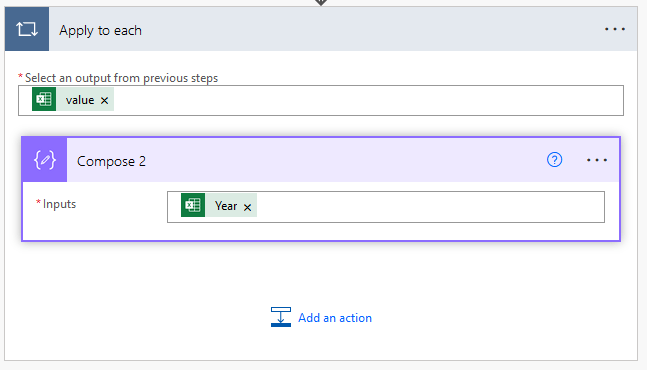
Which means now it can be copied and pasted as you would normal dynamic content.
This method of accessing dynamic content from a dynamically selected table can be really useful to understand. It’s a good first step into understanding how to select content from JSON arrays which is a useful skill to have when working in Power Automate. If you would like to know more about using this method in Power Automate let me know in the comments and we’ll dig in deep to see how it can be leveraged.




 Power Nerd Insights - Power Platform Tips and Tricks
Leave a reply to Top 5 tips for learning Power Automate — beginner edition – Power Nerd Insights – Power Platform Tips and Tricks Cancel reply