A real-world challenge from the Power Apps Challenge community, and how we cracked it
I was recently helping a member in The Power Apps Challenge community. I always love when members bring their real-world scenarios to the table as it always gets me thinking. Recently, one of our members posted a question about how to filter for related records. In their situation they had established a many-to-many relationship in their SharePoint data structure via a junction table. However this question came with a twist: any filtering had to be delegable.
If you’ve worked with large SharePoint lists in Power Apps, you know the headache of non-delegable queries. Fortunately, with a little creativity and some community collaboration, we managed to find a solution that performs well even with thousands of records. Here’s how.
🧩 The Scenario
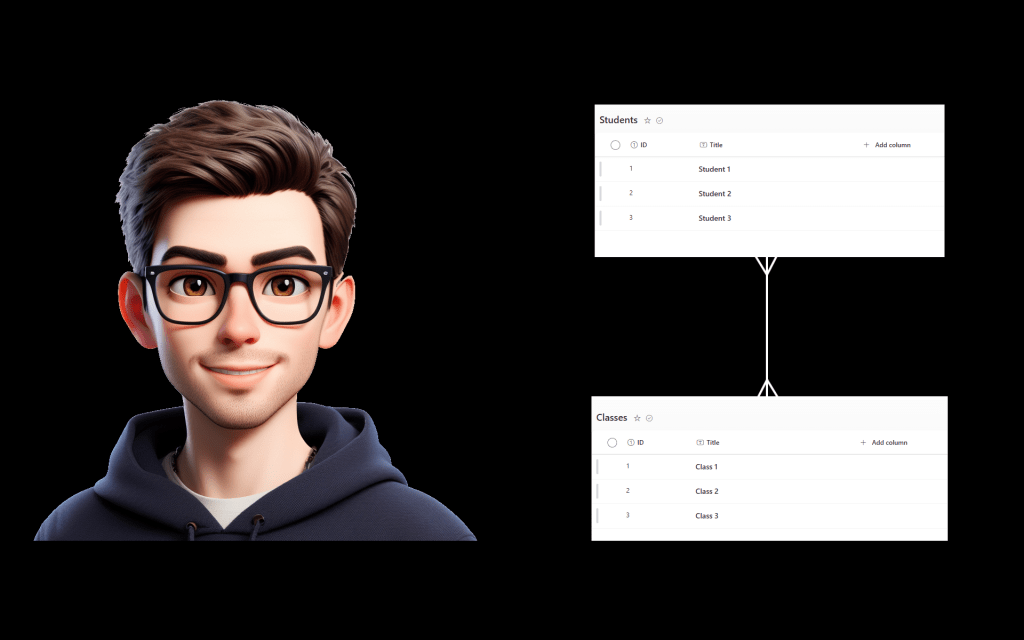
The user had three SharePoint lists involved:
Students– storing information about each student.Classes– storing information about each class.Enrollments– a join table with two columns:StudentIDandClassID.
The goal?
To display students in one gallery and classes in another. When a student is selected, the classes they are enrolled in should display. When a class is selected, the students enrolled in it should display. And all this must be delegable due to large data volumes.
⚠️ The Challenge
Normally, when working with many-to-many relationships in Power Apps, we might use nested Filter() statements or lookup chaining. But these approaches often hit delegation limits once your data grows. With potentially thousands of records in each list, we needed a solution that would avoid delegation issues and still give a responsive UX.
✅ The Solution
Here’s the pattern we used, starting with the OnSelect property of the student gallery items (side note this can either be on an icon, button or the whole item):
Set(gblTxtSelectedRecordType, "Student");

ClearCollect(
    colStudentEnrollments,
    Distinct(
        Filter(
            Enrollments,
            StudentID = ThisItem.ID
        ),
        ClassID
    )
);

Clear(colClasses);

ForAll(
    colStudentEnrollments As CollectionID,
    Collect(
        colClasses,
        LookUp(
            Classes,
            ID = CollectionID.Value
        )
    )
)
Let’s break it down:
- Set a variable (
gblTxtSelectedRecordType) so we know what type of record was selected. This helps with cross-filtering later. - Filter the Enrollments list to get only records where the
StudentIDmatches the selected student. - Use
Distinctto extract just the uniqueClassIDs. - Loop through those IDs using
ForAll, and for each one, useLookUpto collect the corresponding class intocolClasses.
This avoids delegation issues because:
- The initial
Filteris delegable (as it’s a simple equality check). - The
ForAll + LookUpis not delegable, but it runs only on a small in-memory collection (colStudentEnrollments), so it performs reliably.
Then in the Classes gallery, we set the Items property to:
If(
    gblTxtSelectedRecordType = "Student",
    colClasses,
    Classes
)
This means the gallery shows either all classes or only those related to the selected student, depending on what was selected.
🔁 Making It Bi-Directional
To support filtering students based on a selected class, you use a similar pattern, just reversing the logic:
Set(gblTxtSelectedRecordType, "Class");

ClearCollect(
    colClassEnrollments,
    Distinct(
        Filter(
            Enrollments,
            ClassID = ThisItem.ID
        ),
        StudentID
    )
);

Clear(colStudents);

ForAll(
    colClassEnrollments As CollectionID,
    Collect(
        colStudents,
        LookUp(
            Students,
            ID = CollectionID.Value
        )
    )
)
And the Items property of the Students gallery:
If(
    gblTxtSelectedRecordType = "Class",
    colStudents,
    Students
)
🧠 Final Thoughts
This approach isn’t just a workaround—it’s a pattern you can apply to many other many-to-many relationships in Power Apps using SharePoint, Dataverse, or SQL. It’s delegable, scalable, and—best of all—user-friendly.
Massive shoutout to the Power Apps Challenge community for bringing this scenario forward. These shared real-world examples help us all learn, solve, and grow together.
💡 Have a Power Apps challenge of your own?
Join us in the Power Apps Challenge Community and bring it to the table. We’d love to help!



 Power Nerd Insights - Power Platform Tips and Tricks
Leave a comment